
Business teaching helps agents use your exact terminology, follow your processes, and align with your company policies.
Why Teach Your Business Context?
Without business context, agents make generic assumptions. With it, they provide accurate, company-specific responses. Example - Writting a customer support email: Without context: “Most companies offer refunds within 14-30 days. Check your company’s specific policy.” With context: “Our refund policy allows requests within 30 days, processed in 3-5 business days. Would you like me to initiate one?”Key Benefits
Accurate responses
Agents use your exact terms, policies, and processes
Reduced errors
Grounding in your information prevents hallucinations (AI making up incorrect details)
Brand consistency
Agents maintain your voice, tone, and communication style
Better outcomes
Team members get reliable, actionable information
How to Provide Business Context
Add Context to Agent Instructions
Include company-specific information directly in agent instructions. Start with essentials and expand as needed.Voice and Tone Guidelines
Voice and Tone Guidelines
Define how agents should communicate to match your brand.Example:
Terminology and Glossaries
Terminology and Glossaries
Define company-specific terms, product names, and acronyms.Example:Clear definitions prevent misunderstandings and ensure agents use your language.
Policy Integration
Policy Integration
Include relevant policies so agents can answer questions accurately.Example:
Process Instructions
Process Instructions
Document step-by-step workflows agents should follow.Example:Clear processes ensure consistency and completeness in agent actions.
Upload Documents for Deep Context
For extensive information like product documentation, policy manuals, or knowledge bases, upload documents that agents can automatically search and reference when answering questions.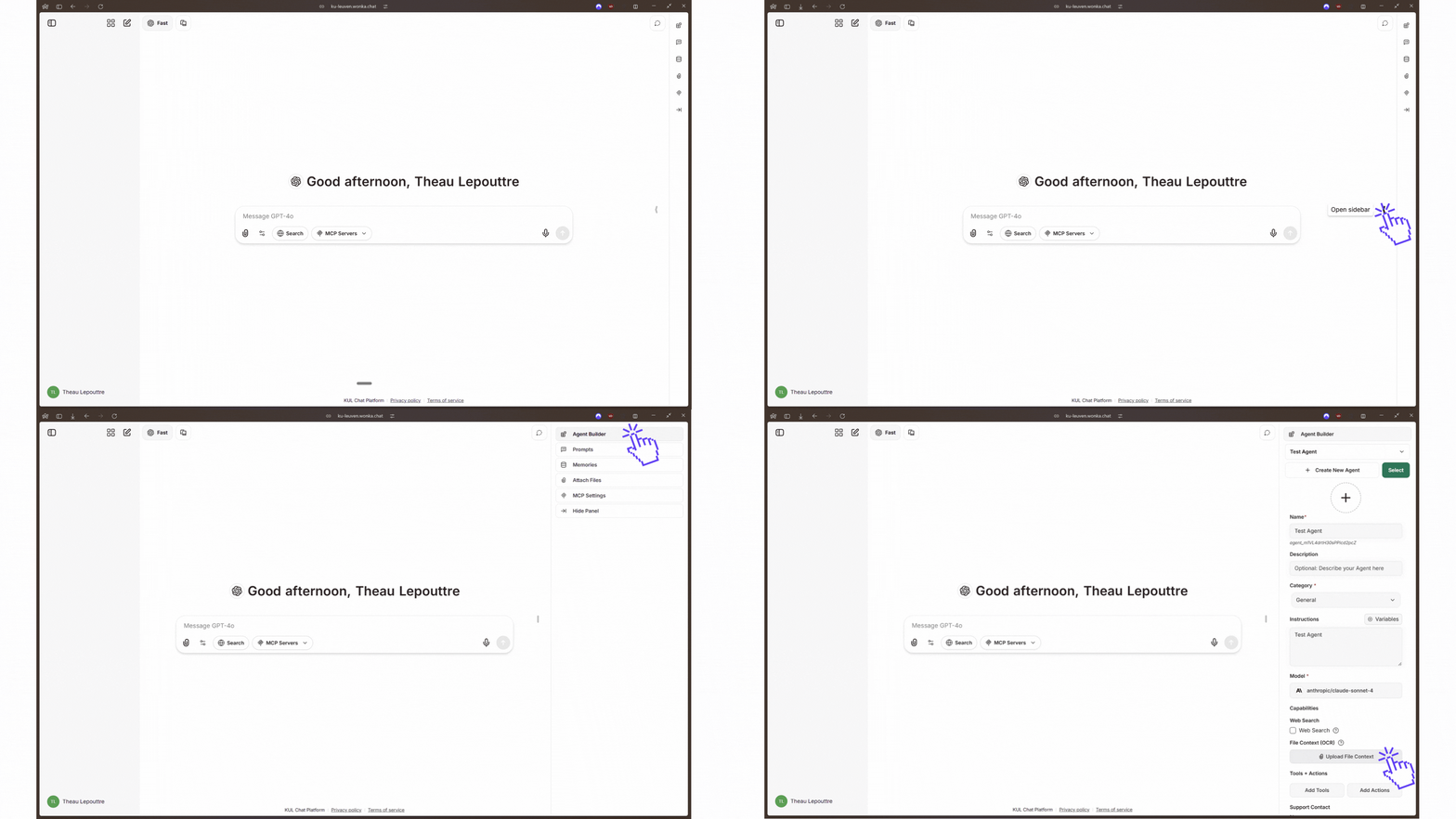
Upload documents for agent context
- Agents can access detailed information without cluttering instructions
- Perfect for comprehensive documentation that’s too large for instructions
- Information stays current by updating documents anytime without changing agent instructions
Technical Details: How Document Retrieval Works
Technical Details: How Document Retrieval Works
When you upload documents, WonkaChat uses RAG (Retrieval-Augmented Generation) to make them searchable for agents.How it works:
- Upload: You provide company documents
- Index: Documents are processed and made searchable
- Retrieve: When relevant, agents automatically find information from documents
- Generate: Agents produce responses grounded in your actual documentation
- Use clear headings: Well-structured sections improve retrieval accuracy
- Keep sections focused: One topic per section
- Include context: Write sections to be understandable independently (e.g., “Our Premium tier ($99/month) includes…” not just “It includes…”)
- Stay consistent: Use the same terminology throughout
- Documents stored securely within your WonkaChat environment
- Never used to train AI models
- Accessible only to users with agent permissions
Examples by Use Case
Customer Support Agent
Customer Support Agent
Context needed: Product features, support policies, troubleshooting steps, communication guidelinesExample instruction snippet:
Email Assistant
Email Assistant
Context needed: Company voice, common email types, approval workflows, internal terminologyExample instruction snippet:
Sales Assistant
Sales Assistant
Context needed: Product positioning, pricing, target audience, sales processes, competitive infoExample instruction snippet: