> ## Documentation Index
> Fetch the complete documentation index at: https://help.wonka.chat/llms.txt
> Use this file to discover all available pages before exploring further.
# Creating Your First Agent
> Build custom AI agents configured for your specific workflows with the right model, instructions, and tools.
Create specialized AI agents tailored to your workflows. This guide covers agent creation from initial setup through deployment.
Building an AI Agent means defining its role, writing instructions, selecting a model, and optionally connecting tools.
## Agent Creation - Video Explanation
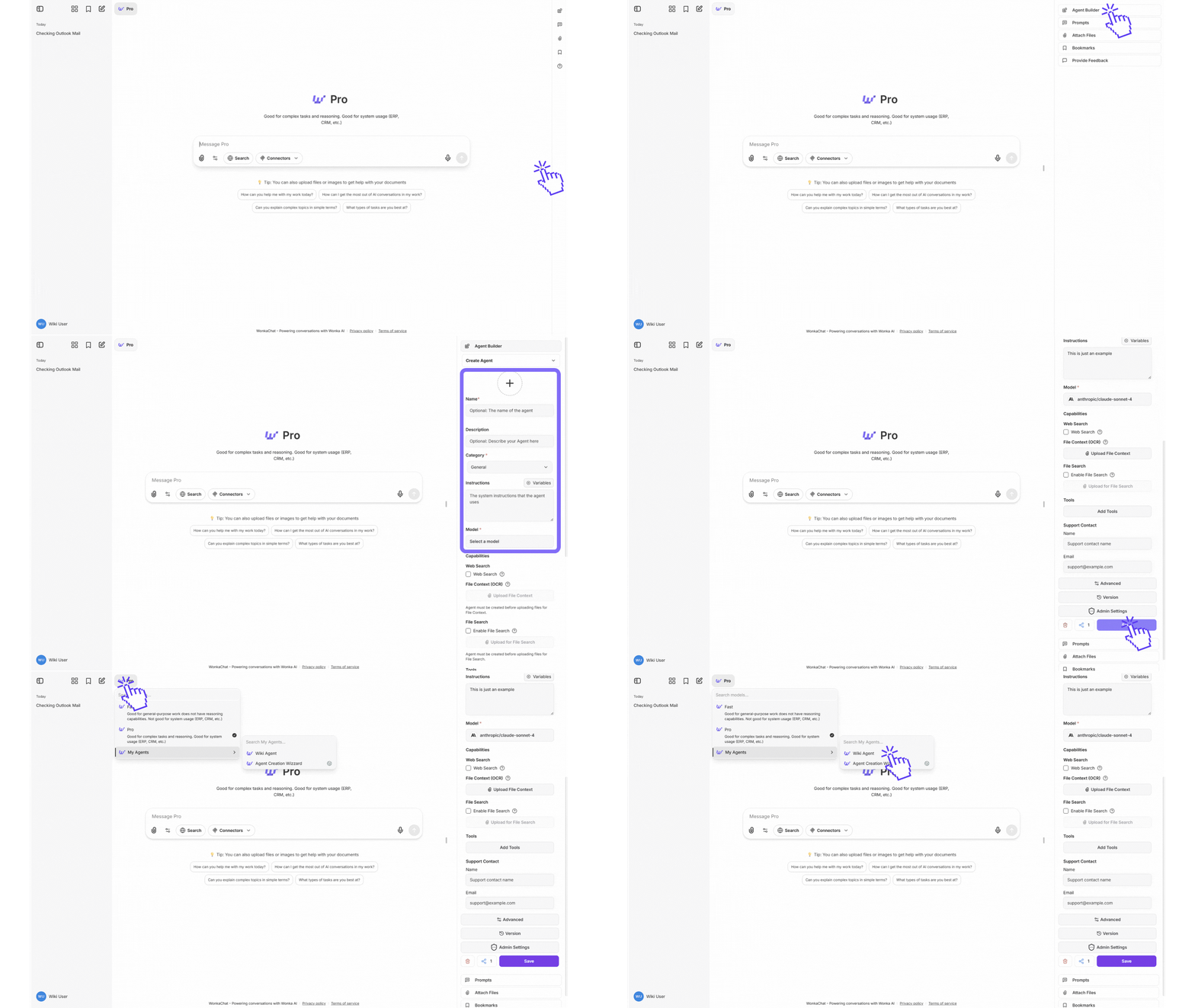
Explore the step-by-step instructions on creating AI agents by video. These two videos visually demonstrates the key decisions and actions you need to build, configure, and deploy your own custom agents.
### Basic Agent:
Watch how to create a basic agent with straightforward instructions. This helps you learning the fundamentals of agent creation.
Start with simple agents to understand the core concepts before moving to more complex agent with tool configurations.
### Tool Connected Agent:
Watch how to create an agent that connects a tool to automate workflows. This is a practical example of cross-system integration.
This example demonstrates how agents can connect other business systems to automate workflows that typically require manual data transfer.
## Agent Creation - Step by Step Explanation
Define your agent's purpose:
* **What task** will this agent handle?
* **How complex** is the workflow?
* **Which tools** does it need?
Navigate to the agent creation interface and click "Create New Agent."
Choose a clear, descriptive name that indicates purpose.
**Good:** "Customer Support Assistant," "Q4 Sales Data Analyzer"\
**Avoid:** "Helper," "Agent 1"
If planning organization-wide sharing, choose names that make sense to all users.
Instructions specify your agent's role, expertise, tone, and behavior. Write clear, detailed instructions to ensure the agent consistently performs as intended.
### Basic Instructions Guide
State what the agent is and does.
**Example:** "You are a customer support specialist for our SaaS platform. Help users resolve technical issues, answer product questions, and guide them through common workflows."
Define tone and format.
**Example:** "Communicate in a friendly, professional tone. Be concise but thorough. Use bullet points for clarity."
Provide specific rules for how the agent should execute tasks and make decisions.
**Example:** "When analyzing sales data, always compare against the previous quarter and year-over-year metrics. If data is incomplete, note the gaps explicitly rather than making assumptions."
Specify when and how the agent should use available tools.
**Example:** "Use the CRM tool to retrieve customer information before making recommendations. When querying the database, limit results to the last 90 days unless specified otherwise."
Include company-specific information.
**Example:** "Support hours: 9 AM-6 PM EST. We offer three tiers: Basic, Pro, Enterprise."
Clear, detailed instructions are the foundation of agent effectiveness.
Select the right model based on your agent's task complexity and usage frequency.
### Quick Selection Guide
**For simple, frequent tasks:**
* Use **GPT-4o mini** (most cost-effective) or **Gemini 2.5 Flash** (fast with large context)
* Also consider: **Claude Haiku 4.5** (fast with near-frontier intelligence)
* Example tasks: Email drafting, data lookup, simple formatting, high-volume operations
**For complex reasoning:**
* Use **Claude Opus 4.5**, **Claude Sonnet 4.5**, **GPT-5.2**, or **GPT-5** (advanced capabilities)
* Example tasks: Multi-step analysis, strategic planning, multi-tool usage, complex coding
**For long context:**
* Use **Gemini 2.5 Pro** (1M context window) or **Gemini 2.5 Flash** (1M context, faster)
* Example tasks: Document analysis, comprehensive research, processing large datasets
Start with a cost-effective model like **GPT-4o mini** or **Claude Haiku 4.5** for most agents. Upgrade to more capable models (Claude Opus 4.5, GPT-5.2, or Gemini 2.5 Pro) only if results don't meet your needs.
**Need detailed guidance?** See the [Model Selection Guide](#model-selection-guide) in the Advanced Knowledge tab for comprehensive comparisons, pricing, and use case recommendations.
Add MCP connection if your agent needs to interact with external systems.
**Tool selection principles:**
* Only add tools the agent actually needs
* Too many tools can cause selection confusion
* Ensure you have permissions for assigned tools
Agents can only access tools explicitly assigned to them and inherit your personal permissions. See the Tool Restrictions section in Access Control for more details.
**Example configurations:**
* **Customer Support:** CRM, ticket system, knowledge base, email
* **Data Analysis:** Database connections, visualization, spreadsheets
* **Content:** Document storage, publishing platform, asset library
Test thoroughly before deployment.
**Test:**
* Core functionality with typical requests
* Edge cases and incomplete information
* Error handling when tools fail
* Consistency across multiple similar requests
Thorough testing ensures users get reliable results.
**Personal use:** Start using immediately, refine based on real usage
**Organization sharing:** Contact administrator, provide context on purpose and value, await review and approval
See [Access Control](/security-governance/access-control) for agent sharing details.
## Best Practices
Define specific goals, actions and expected results for each step to reduce ambiguity.
Anticipate unusual situations and provide handling guidance.
Give agents background information about your business processes and terminology.
Start simple, test thoroughly, refine based on performance and real world use cases.
## Common Mistakes
**Problem:** "You are a helpful assistant" lacks guidance.\
**Solution:** Be specific about role, expertise, tone, and guidelines.
**Problem:** One agent handling unrelated tasks like customer support and data analysis.\
**Solution:** Create focused agents for specific workflows.
**Problem:** Assigning every available tool.\
**Solution:** Only add necessary tools to avoid selection confusion.
**Problem:** Deploying without thorough testing.\
**Solution:** Test extensively with realistic scenarios first.
## AI Agent Instruction Crash Course
This guide introduces five key elements that help create more effective agents. While these fundamentals provide a solid starting point, they represent examples of good practices rather than a complete framework. However, building truly reliable agents requires deeper exploration and iteration beyond these basics.
Define your agent's role, expertise, and perspective to shape response style and depth.
**Example:**
```
You are a senior financial advisor with 20 years of experience
specializing in retirement planning for conservative investors.
```
**Specific beats generic:** "You are a helpful assistant" provides no guidance. Define expertise, experience level, and specialization.
Clearly state the objective and desired outcome for every interaction.
**Example:**
```
Your goal is to analyze sales data from the last quarter,
identify the top 3 declining products, and recommend specific
actions to reverse the trend. Present findings in a concise
executive summary format.
```
Specific, measurable goals produce consistent, actionable results.
Specify which tools to use and when. Provide clear guidelines for tool selection when multiple options exist.
**Example:**
```
Available tools:
- database_query: Use for all customer data lookups
- crm_api: Use only when database is unavailable
- email_tool: Use for sending notifications
Always query the database before making recommendations.
Never update records without explicit user confirmation.
```
Too many similar tools confuse agents. If your agent struggles with tool selection, provide clearer usage criteria or reduce tool count.
Set clear boundaries for format, tone, length, permissions, and prohibited actions.
**Example:**
```
Constraints:
- Keep responses under 200 words unless analysis requires detail
- Use professional but friendly tone
- Never make promises about delivery dates
- If customer requests exceed \$500, escalate to human approval
- Format all data tables in markdown
```
Constraints prevent common failure modes. Add new constraints as you discover edge cases in production.
Provide relevant background information, business rules, and domain-specific knowledge.
**Example:**
```
Company context:
- We serve B2B SaaS customers with 3 pricing tiers
- Standard support hours: 9 AM-6 PM EST, Mon-Fri
- Enterprise customers get priority within 2 hours
- Our refund policy allows 30-day money-back guarantee
- Common abbreviations: ARR (Annual Recurring Revenue),
MRR (Monthly Recurring Revenue)
```
Include terminology, acronyms, business rules, and any domain knowledge the agent needs to interpret requests correctly.
### Quick Framework
Use this template as your starting point:
```
[PERSONA]
You are a [specific role] with [expertise/experience].
[GOALS]
Your objective is to [primary goal]. Focus on [key outcomes].
[CONTEXT]
Important background: [domain knowledge, business rules, terminology]
[TOOLS]
Available tools: [list]
Use [tool A] when [condition].
Use [tool B] for [scenario].
[CONSTRAINTS]
- Format: [requirements]
- Tone: [style guidelines]
- Never: [prohibited actions]
- Always: [required behaviors]
- Escalate when: [escalation criteria]
```
Begin with persona, goal, and constraints. Add complexity only as needed.
Run your prompts against edge cases. Refine based on actual failures.
Prompts improve through real usage. Update based on production learnings.
Explore more advanced techniques with [OpenAI's](https://platform.openai.com/docs/guides/prompt-engineering), [Anthropic's](https://docs.anthropic.com/en/docs/build-with-claude/prompt-engineering/overview), or even [Google's](https://ai.google.dev/gemini-api/docs/prompting-intro) prompting guides.
**Want deeper knowledge?** Search for "prompt engineering best practices", "AI agent design patterns" and "tool calling strategies" to explore advanced techniques.
***
## Model Selection Guide
Quick comparison to help you choose the right model. For detailed specs and benchmarks, visit [OpenAI](https://openai.com), [Anthropic](https://anthropic.com), or [Google DeepMind](https://deepmind.google/technologies/gemini/).
### Model Comparison
| Model | Context | Cost (Input/Output) | Best For |
| --------------- | ------- | ---------------------- | ----------------------------------------------------- |
| **GPT-5.2** | 128K+ | Premium pricing | Latest model, advanced reasoning, complex tasks |
| **GPT-5** | 128K+ | \$2.50 / \$10 per 1M | Advanced coding, agentic workflows, complex reasoning |
| **GPT-4o** | 128K | \$2.50 / \$10 per 1M | General-purpose, balanced tasks, multimodal |
| **GPT-4o mini** | 128K | \$0.15 / \$0.60 per 1M | High-volume, cost-sensitive tasks |
**Key Features:** Strong general performance, proven reliability, multimodal capabilities
| Model | Context | Cost (Input/Output) | Best For |
| --------------------- | ------- | ------------------- | -------------------------------------------------------- |
| **Claude Opus 4.5** | 200K | \$5 / \$25 per 1M | Highest capability, complex reasoning, advanced coding |
| **Claude Sonnet 4.5** | 200K-1M | \$3 / \$15 per 1M | Balanced performance, coding, agents (1M beta) |
| **Claude Sonnet 4** | 200K | \$3 / \$15 per 1M | Strong coding and reasoning |
| **Claude Haiku 4.5** | 200K | \$1 / \$5 per 1M | Fastest, most cost-efficient, near-frontier intelligence |
| **Claude Sonnet 3.7** | 200K | \$3 / \$15 per 1M | General tasks, proven performance |
**Key Features:** Industry-leading coding, strong reasoning, flexible context windows
| Model | Context | Cost (Input/Output) | Best For |
| -------------------------- | ------- | ---------------------------- | -------------------------------------------------- |
| **Gemini 3 Pro Preview** | 1M+ | Preview pricing | Next-gen capabilities, advanced analysis (preview) |
| **Gemini 3 Flash Preview** | 1M+ | Preview pricing | Next-gen speed and efficiency (preview) |
| **Gemini 2.5 Pro** | 1M | \$1.25-2.50 / \$10-15 per 1M | Long documents, complex analysis |
| **Gemini 2.5 Flash** | 1M | \$0.30 / \$2.50 per 1M | Speed, real-time, cost-efficiency |
**Key Features:** Largest context window (1M+ tokens), optimized for speed and document analysis
| Model | Context | Cost (Input/Output) | Best For |
| ------------------------- | ------- | ------------------- | ------------------------------- |
| **Mistral Large Latest** | 128K | Competitive pricing | Strong performance, European AI |
| **Mistral Medium Latest** | 32K | Lower cost | Balanced tasks, cost-effective |
**Key Features:** Open-source foundation, European data sovereignty option
**Pro Models Available:** GPT-5.2, GPT-5, Claude Opus 4.5, Claude Sonnet 4.5, Claude Sonnet 4, and Gemini 2.5 Pro all support advanced reasoning and complex task handling.
### Quick Selection by Task
**Pro:** Claude Opus 4.5, Claude Sonnet 4.5, GPT-5.2, or GPT-5 (advanced coding, large context)\
**Budget:** GPT-4o mini (\$0.15/\$0.60) or Claude Haiku 4.5 (\$1/\$5)
Use Pro models for production code or complex refactoring. Use budget models for scripts and simple tasks.
**Best:** Gemini 2.5 Pro (1M context) or Gemini 3 Pro Preview (1M+ context)\
**Alternative:** Claude Sonnet 4.5 (200K-1M beta), GPT-5.2, or GPT-5
Gemini models handle documents over 200K tokens best with their 1M+ context windows. For deep reasoning on shorter documents, use Claude Opus 4.5, Claude Sonnet 4.5, or GPT-5.2.
**Best:** GPT-4o mini (lowest cost at \$0.15/\$0.60)\
**Alternative:** Gemini 2.5 Flash (faster, 1M context, \$0.30/\$2.50) or Claude Haiku 4.5 (\$1/\$5)
Cost differences compound quickly at scale. GPT-4o mini and Claude Haiku 4.5 can save thousands monthly on high-volume agents.
**Premium Models for Complex Tasks:** GPT-5.2, GPT-5, Claude Opus 4.5, Claude Sonnet 4.5, Gemini 2.5 Pro
**Choose based on needs:**
* **Long context:** Gemini 2.5 Pro (1M tokens) or Claude Sonnet 4.5 (1M beta)
* **Best coding:** Claude Opus 4.5 or Claude Sonnet 4.5 (industry-leading)
* **Latest capabilities:** GPT-5.2 (newest OpenAI model)
* **Balanced:** GPT-5 or Claude Sonnet 4.5
* **Next-gen preview:** Gemini 3 Pro Preview
Use premium models for genuinely complex reasoning, multi-step workflows, and agentic tasks. For simpler tasks, fast models like GPT-4o mini or Claude Haiku 4.5 suffice.
**Fast:** Gemini 2.5 Flash (optimized latency, 1M context) or Gemini 3 Flash Preview (next-gen speed)\
**Fastest & Cheapest:** GPT-4o mini (lowest cost, great speed) or Claude Haiku 4.5 (near-frontier intelligence)
Real-time chat, live data processing, interactive apps, streaming
### Quick Decision Tree
```mermaid theme={null}
graph TD
A[What's your priority?] --> B[Coding]
A --> C[Long Documents]
A --> D[Cost/Volume]
A --> E[Speed]
A --> F[Complex Reasoning]
B --> B1[Claude Opus 4.5 Claude Sonnet 4.5 or GPT-5.2]
C --> C1[Gemini 2.5 Pro Gemini 3 Pro Preview 1M+ context]
D --> D1[GPT-4o mini Claude Haiku 4.5 Cost: 0.15-1.00]
E --> E1[Gemini 2.5 Flash GPT-4o mini Claude Haiku 4.5]
F --> F1[GPT-5.2, GPT-5 Claude Opus 4.5 Claude Sonnet 4.5 Gemini 2.5 Pro]
style B1 fill:#7B68EE,stroke:#5A4DB5,stroke-width:2px,color:#fff
style C1 fill:#FFA94D,stroke:#CC8539,stroke-width:2px,color:#fff
style D1 fill:#51CF66,stroke:#40A852,stroke-width:2px,color:#fff
style E1 fill:#74C0FC,stroke:#4DABF7,stroke-width:2px,color:#fff
style F1 fill:#4A90E2,stroke:#2E5C8A,stroke-width:2px,color:#fff
```
***
## Model Parameters
Fine-tune agent behavior with these parameters. Defaults work for most cases, you should adjust only when needed.
**What it does:** Maximum input length the model can process (includes your prompt + conversation history)
**When to adjust:**
* Your agent needs to process long documents or extensive conversation history
* Default usually sufficient for most agents
Check your model's context limit: GPT-4o (128K), GPT-5/5.2 (128K+), Claude models (200K-1M), Gemini models (1M+)
**What it does:** Limits how long the agent's responses can be
**Recommended values:**
* **Short responses:** 100-300 tokens (\~75-225 words)
* **Standard responses:** 500-1000 tokens (\~375-750 words)
* **Long-form content:** 2000+ tokens
Lower values prevent overly verbose responses and reduce costs. Increase only if responses are being cut off.
**What it does:** Controls creativity vs consistency in responses
**Recommended values:**
* **0.0-0.3:** Factual tasks, data extraction, precise answers. It produces consistent, predictable, and focused responses
* **0.7-1.2:** Creative writing, brainstorming, varied responses. It generates more creative, diverse, and unpredictable outputs
* **1.0:** Balanced setting with good mix of coherence and creativity for most general-purpose tasks (default)
* **1.5-2.0:** Highly creative/unpredictable (rarely needed)
Lower = more predictable and focused. Higher = more creative and diverse.
**What it does:** Alternative to temperature. It limits word choices to most probable options
**Recommended values:**
* **0.1-0.5:** Very focused, consistent outputs
* **0.6-0.8:** Small reduction of diversity
* **0.95-1.0:** Maximum diversity (default)
**Important:** Adjust Temperature OR Top P, not both at the same time. Adjusting both simultaneously can produce unexpected results.
**What it does:** Reduces word/phrase repetition based on how often they've already appeared
**Recommended values:**
* **0.0:** No penalty (default, allows natural repetition)
* **0.3-0.7:** Reduces repetitive phrasing
* **1.0-2.0:** Strongly discourages repetition (may affect quality)
**Use when:** Agent repeats the same phrases, words, or sentence structures too often
**What it does:** Encourages introducing new topics/concepts rather than staying on current ones
**Recommended values:**
* **0.0:** No penalty (default, natural topic continuation)
* **0.3-0.7:** Encourages topic diversity
* **1.0-2.0:** Strongly pushes for new topics (may lose coherence)
**Use when:** You want comprehensive coverage of multiple aspects or agent gets stuck on one topic
**What it does:** Custom text strings that tell the model to stop generating
**How to use:**
* Add specific phrases like `---`, `END`, or custom markers
* Model stops immediately when it generates any stop sequence
* Useful for structured outputs or preventing unwanted continuation
**Example:** Use `\n\n---\n\n` to stop after completing a section
Default settings work well for most use cases. Only adjust if you have specific requirements.
Change one parameter, test, then adjust another. Keep notes on what worked and what didn't
***
## Security Best Practices
Follow these essential security practices when building agents:
### Limit Tool Access
Only grant tools that are absolutely necessary for the agent's specific task. If your agent drafts emails using Outlook or Gmail, remove the "send email" capability to prevent accidental sends. The agent can prepare drafts while you maintain final control over sending.
Fewer tools mean fewer potential bad behavior risks and more predictable output.
### Isolate Integrations
Avoid connecting systems that shouldn't interact with each other in the same agent. If you have two software systems that should remain separate, don't add both integrations to the same agent. Create separate agents for different domains to maintain clear boundaries.
### Test Iteratively
Begin with minimal permissions and test extensively before expanding capabilities. Avoid deploying agents with full permissions initially. Unexpected behavior is common and should be identified during testing.
**Recommended approach:**
* Begin with read-only access when possible
* Test with non-production data first
* Gradually add tools as you verify behavior
* Monitor agent actions closely during initial deployment
Don't try to build everything in one go. Test incrementally to avoid surprising and unwanted results.
### Implement Safeguards
Add protective measures for sensitive operations:
* Require human confirmation for high-impact actions (Safe Mode)
* Define clear boundaries for agent scope and authority
* Test changes in a staging environment before production deployment
See [Security & Governance](/security-governance/security-overview) for comprehensive security practices.