> ## Documentation Index
> Fetch the complete documentation index at: https://help.wonka.chat/llms.txt
> Use this file to discover all available pages before exploring further.
# What is WonkaChat?
> Your enterprise AI assistant that connects to your business tools and runs securely in your environment.
WonkaChat is an enterprise AI assistant that connects directly to your business tools, software, and data to help you accomplish complex tasks through simple conversation while maintaining your privacy and data integrity.
## Core Concept
Wonka Chat consolidates your work across multiple software applications into a single chat interface. Instead of switching between different tools and softwares, you interact with one interface that coordinates actions across your connected systems.
Think of it as your intelligent business assistant that:
* Understands your company's processes and data
* Connects to all your existing softwares and tools
* Executes multi-step workflows across different platforms
* Keeps your data secure within your environment
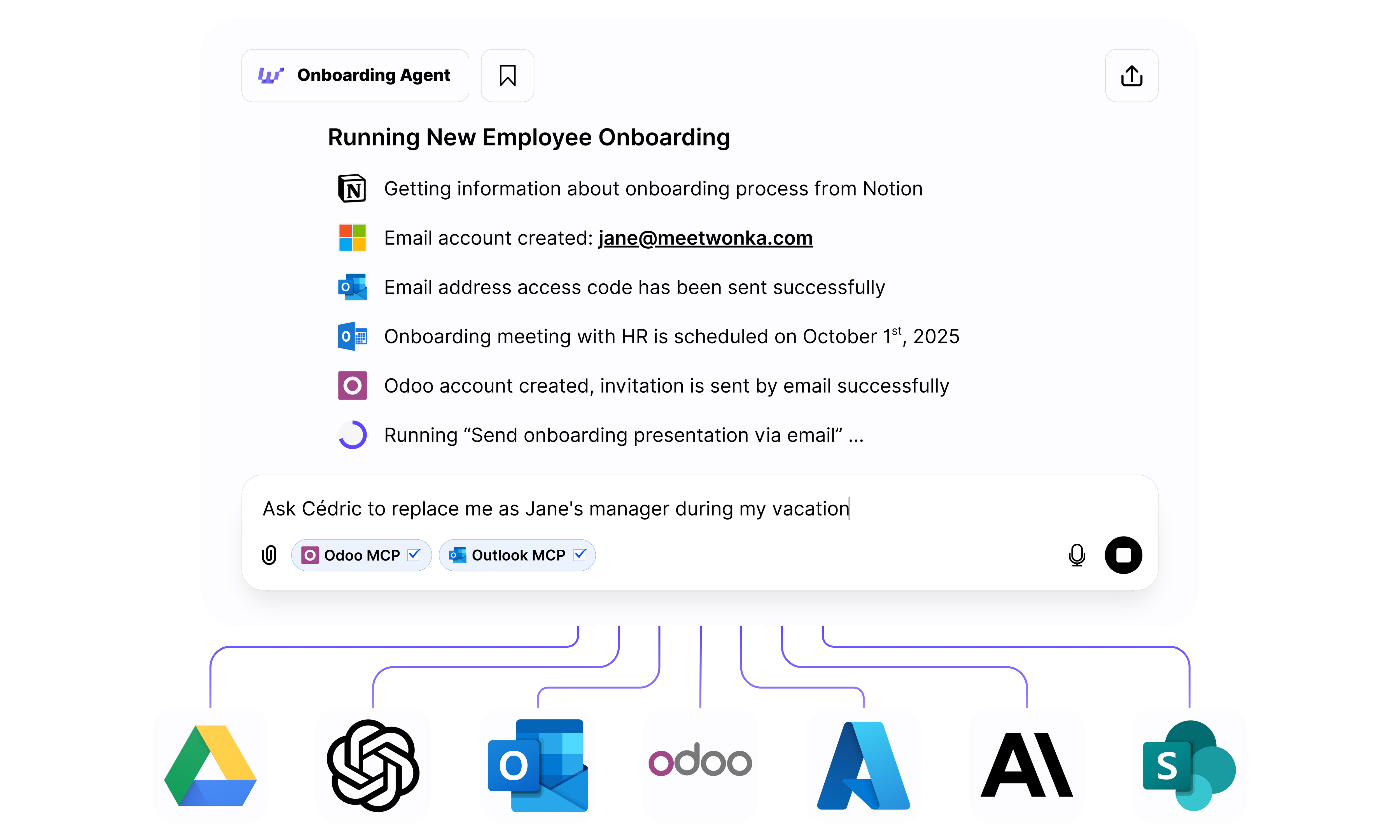 In this example, a request to "Run New Employee Onboarding" automatically:
1. ✅ Gets information from **Notion** (onboarding checklist)
2. ✅ Creates email account in **Microsoft 365**
3. ✅ Sends access codes via **Outlook**
4. ✅ Schedules onboarding meeting in **Outlook Calendar**
5. ✅ Creates **Odoo** account and sends invitation
6. ✅ Sends onboarding presentation via email
This is the power of WonkaChat: complex multi-step workflows across different softwares, managed through natural conversation.
In this example, a simple request triggers actions across Notion, Outlook, Odoo, and other tools, all coordinated through one platform and one conversation.
***
## Key Capabilities
Create specialized agents for specific tasks like onboarding, reporting, or customer support that run autonomously on your behalf.
Connect your existing softwares and business tools (from PM to CRM to communication platforms) so WonkaChat can work with your data.
Choose between thinking and fast/non-thinking models based on task complexity, and choose any AI model from any provider.
Use your company's knowledge by uploading documents and providing context. The AI will adapt to your processes, terminology, and workflows.
***
## What Can You Accomplish?
Real examples of what teams are doing with WonkaChat:
Automatically create accounts, schedule meetings, send welcome materials, and set up access across all your systems with a single request.
**Example:** "Onboard John Smith starting Monday" → Creates email, schedules HR meeting, adds to Slack, creates CRM account, sends laptop request.
Find information across all your connected systems (emails, documents, databases, wikis) without remembering where things are stored.
**Example:** "Find the Q3 marketing budget proposal" → Searches Google Drive, SharePoint, Notion, and Confluence simultaneously.
Generate reports by pulling data from multiple sources, analyzing trends, and formatting results with no manual spreadsheet work.
**Example:** "Create a sales performance report for last month" → Pulls CRM data, calculates metrics, generates formatted report.
Execute complex multi-step processes that span different tools, eliminating manual coordination and context switching.
**Example:** "Create project in PM tool, notify team in Slack, send welcome email, schedule kickoff" → All happens automatically.
Schedule meetings considering everyone's availability, send agendas from templates, capture notes, and distribute action items, all in one flow.
**Example:** "Schedule quarterly review with leadership team next week" → Finds time slots, sends invites with agenda, creates notes doc.
Answer support questions using your knowledge base, create tickets, escalate when needed, and update customers to reduce response time.
**Example:** "Customer asking about refund policy" → Retrieves policy, drafts response, creates ticket if needed, logs interaction.
These workflows run through simple conversation with no coding or complex configuration required.
***
## Ready to Get Started?
Discover the unique advantages and security benefits of using WonkaChat for your team.
Get up and running with your first conversation in just 5 minutes.
In this example, a request to "Run New Employee Onboarding" automatically:
1. ✅ Gets information from **Notion** (onboarding checklist)
2. ✅ Creates email account in **Microsoft 365**
3. ✅ Sends access codes via **Outlook**
4. ✅ Schedules onboarding meeting in **Outlook Calendar**
5. ✅ Creates **Odoo** account and sends invitation
6. ✅ Sends onboarding presentation via email
This is the power of WonkaChat: complex multi-step workflows across different softwares, managed through natural conversation.
In this example, a simple request triggers actions across Notion, Outlook, Odoo, and other tools, all coordinated through one platform and one conversation.
***
## Key Capabilities
Create specialized agents for specific tasks like onboarding, reporting, or customer support that run autonomously on your behalf.
Connect your existing softwares and business tools (from PM to CRM to communication platforms) so WonkaChat can work with your data.
Choose between thinking and fast/non-thinking models based on task complexity, and choose any AI model from any provider.
Use your company's knowledge by uploading documents and providing context. The AI will adapt to your processes, terminology, and workflows.
***
## What Can You Accomplish?
Real examples of what teams are doing with WonkaChat:
Automatically create accounts, schedule meetings, send welcome materials, and set up access across all your systems with a single request.
**Example:** "Onboard John Smith starting Monday" → Creates email, schedules HR meeting, adds to Slack, creates CRM account, sends laptop request.
Find information across all your connected systems (emails, documents, databases, wikis) without remembering where things are stored.
**Example:** "Find the Q3 marketing budget proposal" → Searches Google Drive, SharePoint, Notion, and Confluence simultaneously.
Generate reports by pulling data from multiple sources, analyzing trends, and formatting results with no manual spreadsheet work.
**Example:** "Create a sales performance report for last month" → Pulls CRM data, calculates metrics, generates formatted report.
Execute complex multi-step processes that span different tools, eliminating manual coordination and context switching.
**Example:** "Create project in PM tool, notify team in Slack, send welcome email, schedule kickoff" → All happens automatically.
Schedule meetings considering everyone's availability, send agendas from templates, capture notes, and distribute action items, all in one flow.
**Example:** "Schedule quarterly review with leadership team next week" → Finds time slots, sends invites with agenda, creates notes doc.
Answer support questions using your knowledge base, create tickets, escalate when needed, and update customers to reduce response time.
**Example:** "Customer asking about refund policy" → Retrieves policy, drafts response, creates ticket if needed, logs interaction.
These workflows run through simple conversation with no coding or complex configuration required.
***
## Ready to Get Started?
Discover the unique advantages and security benefits of using WonkaChat for your team.
Get up and running with your first conversation in just 5 minutes.