> ## Documentation Index
> Fetch the complete documentation index at: https://help.wonka.chat/llms.txt
> Use this file to discover all available pages before exploring further.
# External Connections
> Connect WonkaChat to your softwares, business tools and data sources to access real information and take actions on your behalf.
WonkaChat can connect to your business tools, databases, and software, enabling you to access real information and take actions through natural conversation. These are called **Connectors** or **MCP connections** for more technical people.
Want to understand the technical details of how these connections work?
[Jump to Technical Details](#technical-details) to learn about the Model Context Protocol (MCP) that powers these integrations.
## What External connection Enables
Connecting your external softwares and data sources transforms WonkaChat from a standalone AI assistant into a connected system that can work with your actual data and workflows. Instead of just answering general questions, WonkaChat can access your real emails, manage your calendar, update your CRM, create documents in your systems, and coordinate actions across multiple platforms, all through natural conversation.
### Real-World Capabilities
Read emails, calendar events, documents, and databases through natural conversation without switching between apps.
Send emails, create tasks, update records, and trigger workflows, all by asking WonkaChat in plain language.
Combine multiple connections in a single request. For example: "Check my calendar, find open slots, and email them to John."
Access live data from your systems rather than relying on static knowledge or manual updates.
### How to Get Started
Go to the settings and connect to the tool (like Outlook, Gmail, or Slack) by providing your credentials. Then add it to your chat.
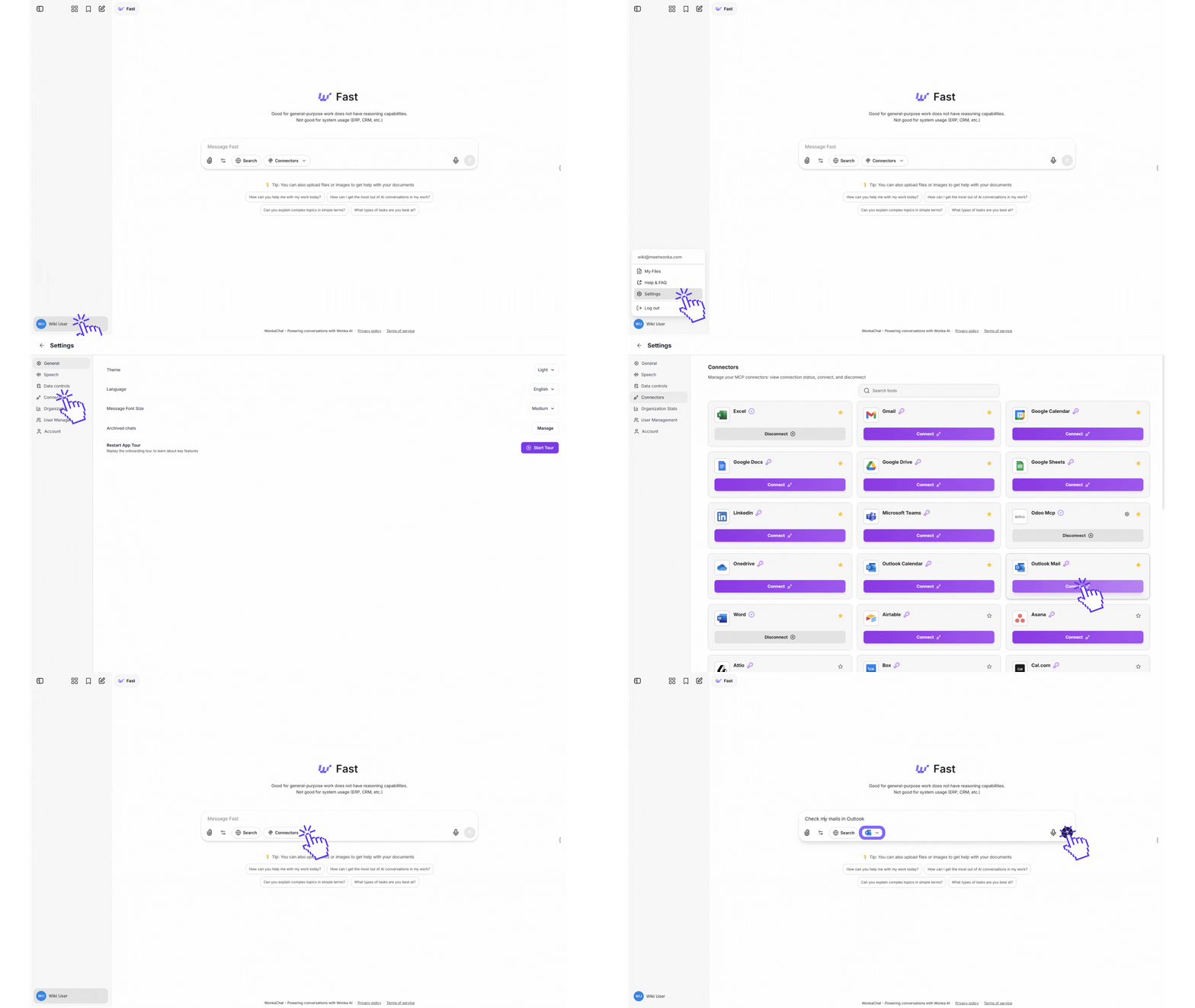 These external connections are called "MCP" (Model Context Protocol).
While **you don't need to understand the technical details to use them**, you can learn more in the [Technical Details](#technical-details) section if you're curious.
A secure connection is established between WonkaChat and your business tools. WonkaChat works on your behalf using natural language, operating within your existing permissions.
**Important:** WonkaChat inherits your exact permissions. It can only access data and perform actions that you personally have permission to do. If you can't access a file, send an email from a specific account, or modify a record in your regular workflow, WonkaChat can't do it either.
Ask questions or make requests in plain language. WonkaChat automatically uses the right tools and actions to help you.
```
"What emails did I receive from Sarah this week?"
```
WonkaChat connects to your email, retrieves the information, and presents it clearly.
***
## External Connections (MCP) Example
Connecting your business tools dramatically changes what WonkaChat can accomplish. Here's a real example showing the difference:
**Your request:**
```
"Schedule a meeting with the marketing team for next Tuesday at 2 PM to discuss the Q2 campaign results."
```
**WonkaChat's response (limited):**
```
I can help you draft a meeting invitation, but I cannot access your calendar
or email system to actually schedule the meeting.
Here's what I suggest:
1. Check your calendar for availability on Tuesday at 2 PM
2. Send a meeting invite to your marketing team
3. Include "Q2 Campaign Results Discussion" as the subject
Would you like me to draft the meeting invitation text for you?
```
Without connections, WonkaChat can only provide general guidance and cannot access your actual data or take real actions.
**Your request:**
```
"Schedule a meeting with the marketing team for next Tuesday at 2 PM to discuss the Q2 campaign results."
```
**WonkaChat's response (powerful):**
```
I'll schedule that meeting for you.
Checking your calendar... Tuesday at 2 PM is available.
Looking up "marketing team" members... Found 5 team members:
- Sarah Johnson (Marketing Director)
- Mike Chen (Content Lead)
- Emma Rodriguez (Social Media Manager)
- David Kim (Analytics Specialist)
- Lisa Wang (Designer)
Creating meeting invite with:
- Title: "Q2 Campaign Results Discussion"
- Time: Tuesday, October 21, 2025 at 2:00 PM - 3:00 PM
- Location: Conference Room B (reserved)
- Attendees: All 5 marketing team members
✓ Meeting scheduled and invitations sent.
✓ Conference room reserved.
✓ Calendar updated.
Is there anything else you'd like me to add to the meeting?
```
With connections, WonkaChat accesses your real calendar, identifies team members, checks room availability, and completes the entire task automatically.
This example shows how connecting your business tools enables WonkaChat to move from giving advice to taking real actions with your actual business data.
***
## Available External Connections (MCP)
WonkaChat supports MCP connections to **40+ business tools** across all major categories. Here are all the currently available connections:
Connect your Microsoft tools for comprehensive office productivity.
**Available Connections:**
* Outlook Mail (email)
* Outlook Calendar (scheduling)
* Microsoft Teams (communication)
* OneDrive (storage)
* Excel (spreadsheets)
* Word (documents)
Integrate with Google's suite of productivity and collaboration tools.
**Available Connections:**
* Gmail (email)
* Google Calendar (scheduling)
* Google Drive (storage)
* Google Docs (documents)
* Google Sheets (spreadsheets)
Connect your project management and team collaboration platforms.
**Available Connections:**
* Asana (project management)
* ClickUp (productivity)
* Jira (issue tracking)
* Linear (project management)
* Monday (work management)
* Notion (knowledge base)
* Confluence (documentation)
Integrate with customer relationship management and sales platforms.
**Available Connections:**
* Salesforce (CRM)
* HubSpot (CRM & marketing)
* Attio (CRM)
* Close (sales CRM)
* Klaviyo (marketing automation)
Connect your development tools, repositories, and deployment platforms.
**Available Connections:**
* GitHub (version control)
* GitLab (version control)
* Vercel (deployment)
* Supabase (database)
Integrate messaging and scheduling tools for seamless communication.
**Available Connections:**
* Slack (team messaging)
* Cal.com (scheduling)
* LinkedIn (professional networking)
Connect file storage and data management platforms.
**Available Connections:**
* Airtable (database)
* Box (storage)
* Fathom (analytics)
Integrate design and specialized business tools.
**Available Connections:**
* Figma (design)
* Odoo (ERP)
Need a connection that's not listed? [Contact our support team](/support-resources/getting-help) to request new MCP integrations. We're constantly expanding our connection library based on user needs.
## Understanding the Model Context Protocol (MCP)
WonkaChat uses the **Model Context Protocol (MCP)** to connect AI models with your business tools, databases, and software, enabling AI to access real information and take actions on your behalf.
MCP is an open protocol that allows AI systems to communicate with external data sources and softwares in a uniform way.
Think of it as a universal connector (like USB for AI systems) that allows different AI models and software tools to work together seamlessly without custom integrations for each combination.
### How MCP Works
Instead of building custom connectors for each AI and data source pair, MCP allows all AI clients and data sources to be connected through a single integration.
These external connections are called "MCP" (Model Context Protocol).
While **you don't need to understand the technical details to use them**, you can learn more in the [Technical Details](#technical-details) section if you're curious.
A secure connection is established between WonkaChat and your business tools. WonkaChat works on your behalf using natural language, operating within your existing permissions.
**Important:** WonkaChat inherits your exact permissions. It can only access data and perform actions that you personally have permission to do. If you can't access a file, send an email from a specific account, or modify a record in your regular workflow, WonkaChat can't do it either.
Ask questions or make requests in plain language. WonkaChat automatically uses the right tools and actions to help you.
```
"What emails did I receive from Sarah this week?"
```
WonkaChat connects to your email, retrieves the information, and presents it clearly.
***
## External Connections (MCP) Example
Connecting your business tools dramatically changes what WonkaChat can accomplish. Here's a real example showing the difference:
**Your request:**
```
"Schedule a meeting with the marketing team for next Tuesday at 2 PM to discuss the Q2 campaign results."
```
**WonkaChat's response (limited):**
```
I can help you draft a meeting invitation, but I cannot access your calendar
or email system to actually schedule the meeting.
Here's what I suggest:
1. Check your calendar for availability on Tuesday at 2 PM
2. Send a meeting invite to your marketing team
3. Include "Q2 Campaign Results Discussion" as the subject
Would you like me to draft the meeting invitation text for you?
```
Without connections, WonkaChat can only provide general guidance and cannot access your actual data or take real actions.
**Your request:**
```
"Schedule a meeting with the marketing team for next Tuesday at 2 PM to discuss the Q2 campaign results."
```
**WonkaChat's response (powerful):**
```
I'll schedule that meeting for you.
Checking your calendar... Tuesday at 2 PM is available.
Looking up "marketing team" members... Found 5 team members:
- Sarah Johnson (Marketing Director)
- Mike Chen (Content Lead)
- Emma Rodriguez (Social Media Manager)
- David Kim (Analytics Specialist)
- Lisa Wang (Designer)
Creating meeting invite with:
- Title: "Q2 Campaign Results Discussion"
- Time: Tuesday, October 21, 2025 at 2:00 PM - 3:00 PM
- Location: Conference Room B (reserved)
- Attendees: All 5 marketing team members
✓ Meeting scheduled and invitations sent.
✓ Conference room reserved.
✓ Calendar updated.
Is there anything else you'd like me to add to the meeting?
```
With connections, WonkaChat accesses your real calendar, identifies team members, checks room availability, and completes the entire task automatically.
This example shows how connecting your business tools enables WonkaChat to move from giving advice to taking real actions with your actual business data.
***
## Available External Connections (MCP)
WonkaChat supports MCP connections to **40+ business tools** across all major categories. Here are all the currently available connections:
Connect your Microsoft tools for comprehensive office productivity.
**Available Connections:**
* Outlook Mail (email)
* Outlook Calendar (scheduling)
* Microsoft Teams (communication)
* OneDrive (storage)
* Excel (spreadsheets)
* Word (documents)
Integrate with Google's suite of productivity and collaboration tools.
**Available Connections:**
* Gmail (email)
* Google Calendar (scheduling)
* Google Drive (storage)
* Google Docs (documents)
* Google Sheets (spreadsheets)
Connect your project management and team collaboration platforms.
**Available Connections:**
* Asana (project management)
* ClickUp (productivity)
* Jira (issue tracking)
* Linear (project management)
* Monday (work management)
* Notion (knowledge base)
* Confluence (documentation)
Integrate with customer relationship management and sales platforms.
**Available Connections:**
* Salesforce (CRM)
* HubSpot (CRM & marketing)
* Attio (CRM)
* Close (sales CRM)
* Klaviyo (marketing automation)
Connect your development tools, repositories, and deployment platforms.
**Available Connections:**
* GitHub (version control)
* GitLab (version control)
* Vercel (deployment)
* Supabase (database)
Integrate messaging and scheduling tools for seamless communication.
**Available Connections:**
* Slack (team messaging)
* Cal.com (scheduling)
* LinkedIn (professional networking)
Connect file storage and data management platforms.
**Available Connections:**
* Airtable (database)
* Box (storage)
* Fathom (analytics)
Integrate design and specialized business tools.
**Available Connections:**
* Figma (design)
* Odoo (ERP)
Need a connection that's not listed? [Contact our support team](/support-resources/getting-help) to request new MCP integrations. We're constantly expanding our connection library based on user needs.
## Understanding the Model Context Protocol (MCP)
WonkaChat uses the **Model Context Protocol (MCP)** to connect AI models with your business tools, databases, and software, enabling AI to access real information and take actions on your behalf.
MCP is an open protocol that allows AI systems to communicate with external data sources and softwares in a uniform way.
Think of it as a universal connector (like USB for AI systems) that allows different AI models and software tools to work together seamlessly without custom integrations for each combination.
### How MCP Works
Instead of building custom connectors for each AI and data source pair, MCP allows all AI clients and data sources to be connected through a single integration.
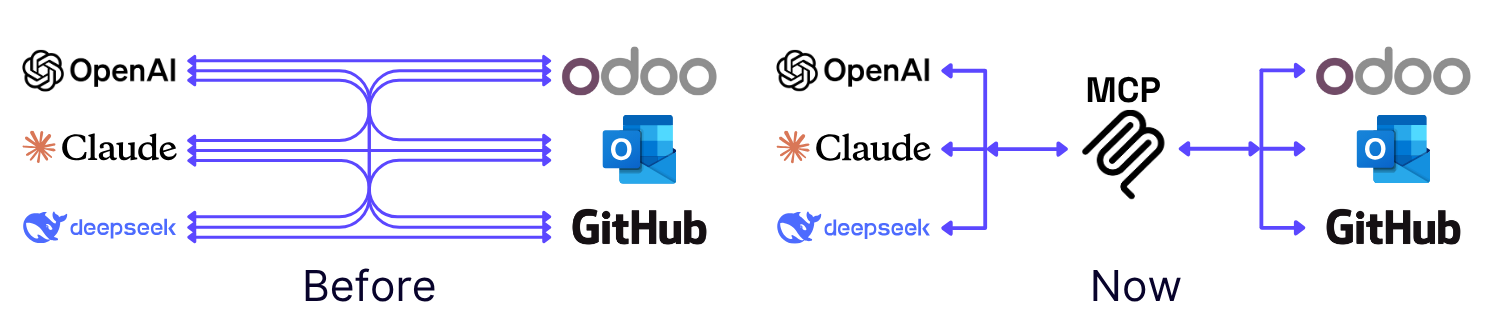
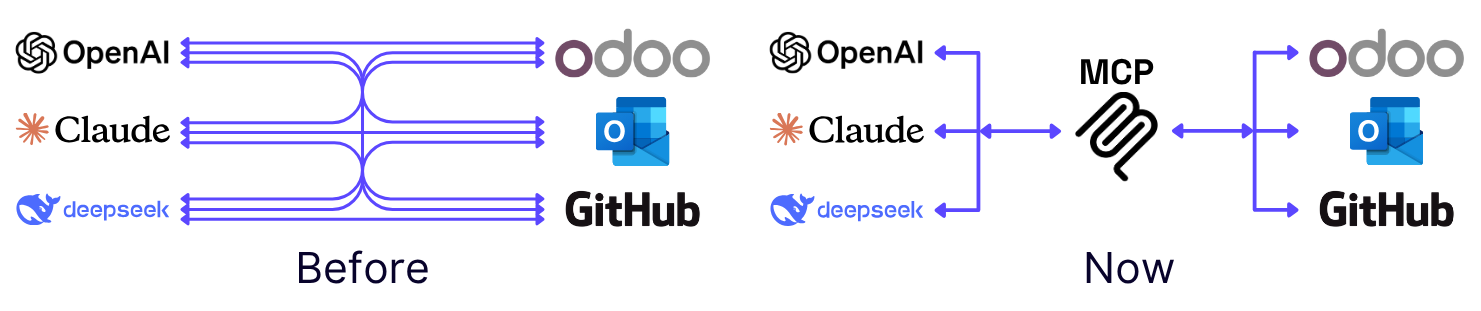 **In simple terms:** The AI Client (WonkaChat) sends structured requests through MCP. The MCP Server communicates with your underlying systems (Outlook, GitHub, Odoo, etc.) and sends back a structured response.
***
## Risk Management & Security
**In simple terms:** The AI Client (WonkaChat) sends structured requests through MCP. The MCP Server communicates with your underlying systems (Outlook, GitHub, Odoo, etc.) and sends back a structured response.
***
## Risk Management & Security
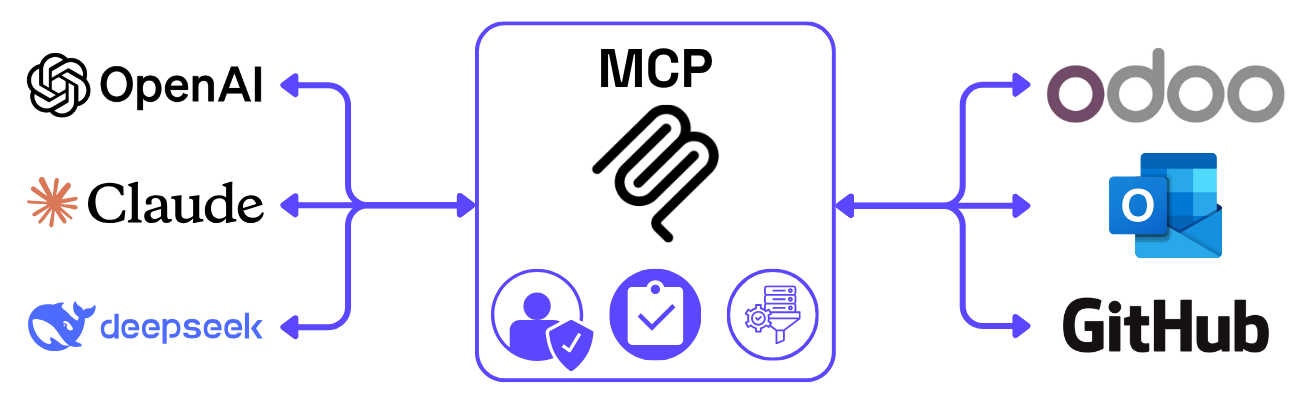
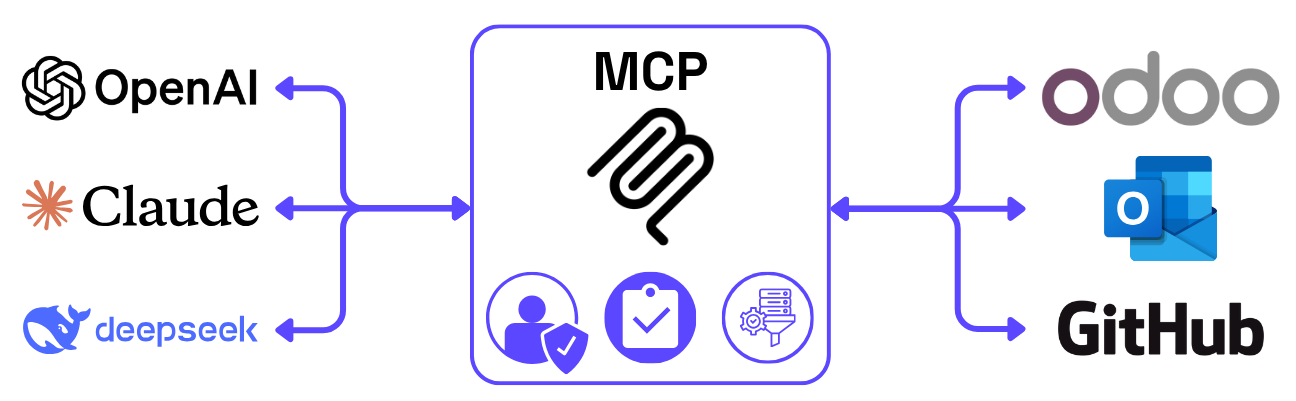 One of the biggest concerns around AI is how it accesses and uses sensitive data.
**MCP addresses this by acting as a security checkpoint for all your AI systems**, tracking every data interaction and enforcing company policies. Think of it as having a detailed log of who accessed what, when, and why, which is essential for regulatory compliance.
### How MCP Protects Your Data
MCP introduces a central layer through which all AI interactions are channeled. This provides **consistency in security policies**, enabling companies to enforce authentication, authorization, and data masking at the protocol level.
All your AI tools connect through one secure gateway, rather than having separate security implementations for each connection.
MCP aligns AI behavior with internal business policies. Because all capabilities are exposed and managed through the MCP server, companies can define exactly **what an AI system is allowed to do** and nothing more.
AI systems **can't access sensitive data** or trigger actions they haven't been explicitly granted. Every permission is controlled and auditable.
Every interaction through MCP is logged:
* **Who** accessed the data (user identity)
* **What** data was accessed (resources, actions)
* **When** it happened (timestamps)
* **Why** it was needed (context, request details)
This detailed logging is essential for regulatory compliance and security audits.
***
## MCP Architecture Overview
The Model Context Protocol is an open standard developed by [Anthropic](https://www.anthropic.com/news/model-context-protocol) that enables secure, two-way connections between AI applications and external data sources.
WonkaChat implements MCP as a client, connecting to MCP servers that expose your business tools and data to the AI models. Learn more at [modelcontextprotocol.io](https://modelcontextprotocol.io).
### Technical Implementation
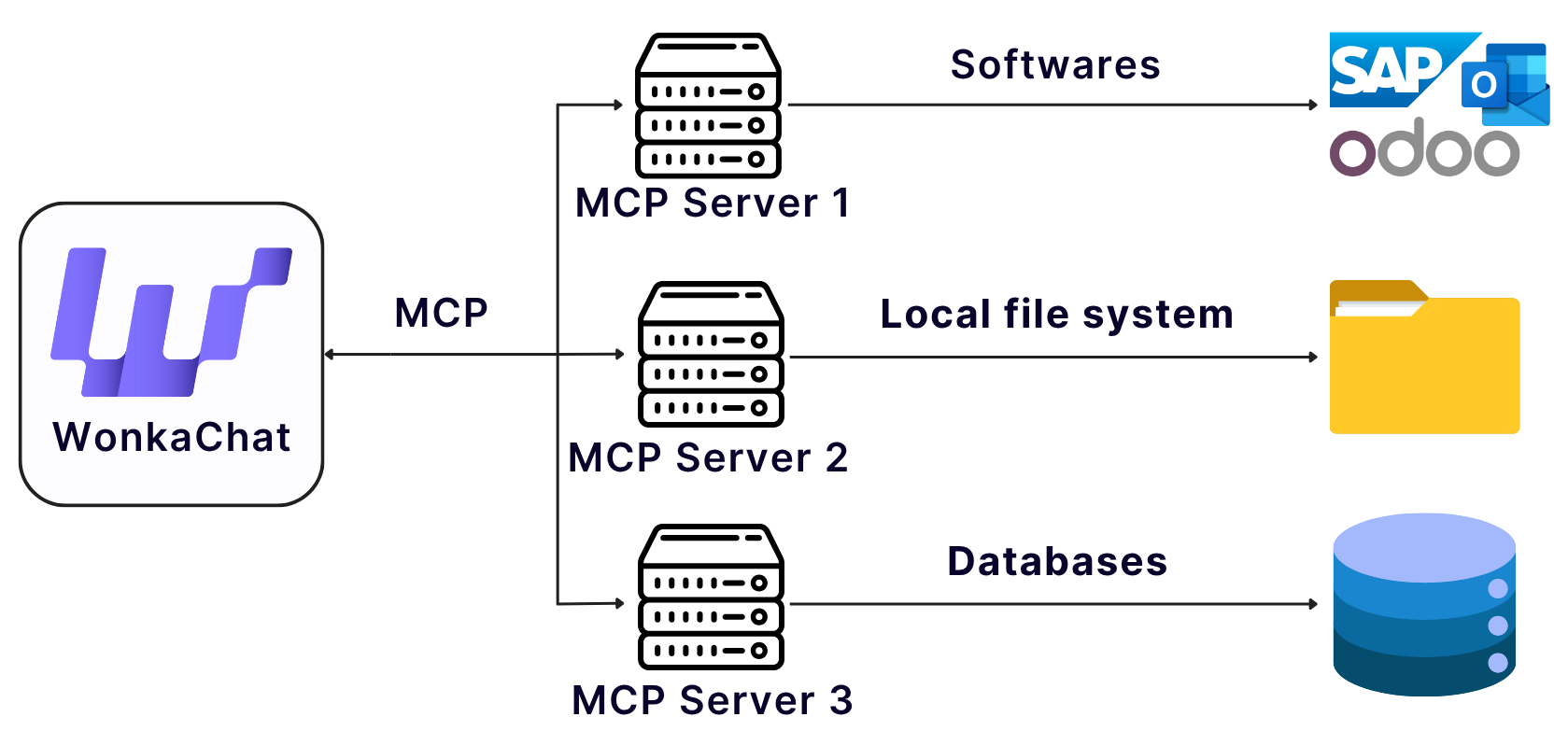
MCP uses a **client-server architecture** where WonkaChat acts as the MCP Client, connecting to MCP Servers that integrate with your business tools:
One of the biggest concerns around AI is how it accesses and uses sensitive data.
**MCP addresses this by acting as a security checkpoint for all your AI systems**, tracking every data interaction and enforcing company policies. Think of it as having a detailed log of who accessed what, when, and why, which is essential for regulatory compliance.
### How MCP Protects Your Data
MCP introduces a central layer through which all AI interactions are channeled. This provides **consistency in security policies**, enabling companies to enforce authentication, authorization, and data masking at the protocol level.
All your AI tools connect through one secure gateway, rather than having separate security implementations for each connection.
MCP aligns AI behavior with internal business policies. Because all capabilities are exposed and managed through the MCP server, companies can define exactly **what an AI system is allowed to do** and nothing more.
AI systems **can't access sensitive data** or trigger actions they haven't been explicitly granted. Every permission is controlled and auditable.
Every interaction through MCP is logged:
* **Who** accessed the data (user identity)
* **What** data was accessed (resources, actions)
* **When** it happened (timestamps)
* **Why** it was needed (context, request details)
This detailed logging is essential for regulatory compliance and security audits.
***
## MCP Architecture Overview
The Model Context Protocol is an open standard developed by [Anthropic](https://www.anthropic.com/news/model-context-protocol) that enables secure, two-way connections between AI applications and external data sources.
WonkaChat implements MCP as a client, connecting to MCP servers that expose your business tools and data to the AI models. Learn more at [modelcontextprotocol.io](https://modelcontextprotocol.io).
### Technical Implementation
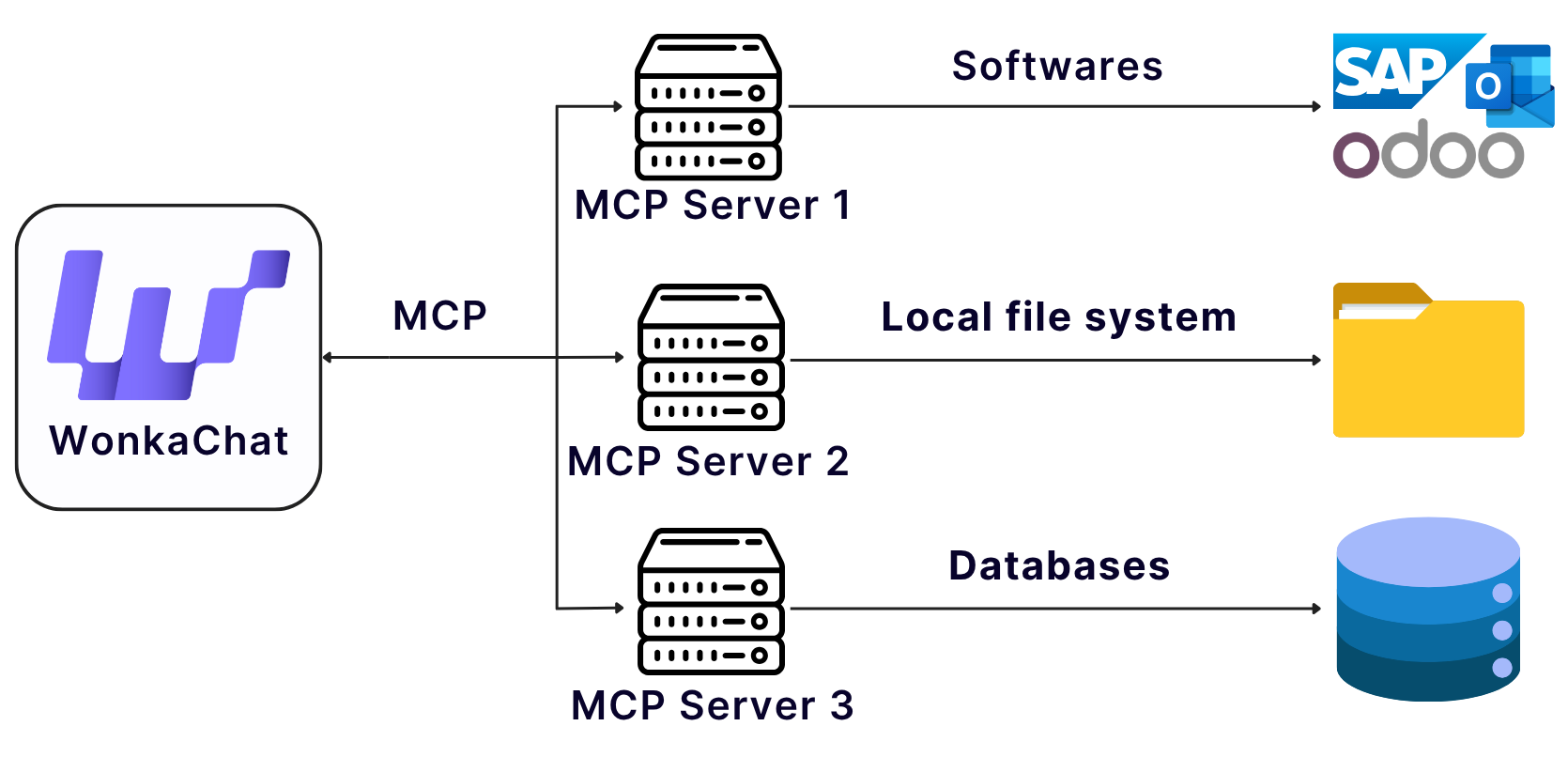
MCP uses a **client-server architecture** where WonkaChat acts as the MCP Client, connecting to MCP Servers that integrate with your business tools:
 **Architecture Flow:**
* **WonkaChat (MCP Client)** sends structured requests and manages authentication
* **MCP Server** acts as the integration layer, connecting to external systems
* **External Systems** (Outlook, Odoo, Salesforce, etc.) provide data via their APIs
* All responses flow back through the same secure channel
**Key Technical Benefits:**
* JSON-RPC based communication protocol
* Capability negotiation during initialization
* Clear security boundaries via client-host-server architecture
* User consent mechanisms for AI interactions
### Security Implementation
WonkaChat implements MCP with enterprise-grade security features that build upon the protocol's foundation:
**Built into the Protocol:**
* **User Consent**: All AI actions require explicit user authorization ([MCP Best Practices](https://modelcontextprotocol.io/specification/draft/basic/security_best_practices))
* **Capability Negotiation**: Clients and servers agree on available features during initialization
* **Token Validation**: Servers only accept tokens explicitly issued for them (OAuth 2.1 framework)
* **Session Management**: Secure session handling to prevent hijacking and impersonation
* **Security Boundaries**: Client-host-server architecture with clear isolation
**Recommended by MCP:**
* Input validation and sanitization for all parameters
* Rate limiting and abuse monitoring
* Secure transport (TLS encryption) for all connections
**Authentication & Access Control:**
* OAuth 2.0 for third-party services (Google, Microsoft, Salesforce)
* API key authentication for developer tools
* Token encryption at rest (AES-256) with automatic refresh
* Per-user token storage with complete isolation
* Users inherit only their existing platform permissions
**Enterprise Security:**
* Role-Based Access Control (RBAC) at organizational level
* Centralized security policies across all MCP connections
* Connection timeouts and resource protection
* Multi-region deployment with secure failover
**WonkaChat's Audit Trail:**
Detailed audit and compliance features documentation coming soon.
These are WonkaChat implementation features, not built into the MCP protocol itself.
If you have specific requirements or unique needs for MCP integrations, reach out to our support team. We're here to help expand or tailor connections to fit your workflows.
**Architecture Flow:**
* **WonkaChat (MCP Client)** sends structured requests and manages authentication
* **MCP Server** acts as the integration layer, connecting to external systems
* **External Systems** (Outlook, Odoo, Salesforce, etc.) provide data via their APIs
* All responses flow back through the same secure channel
**Key Technical Benefits:**
* JSON-RPC based communication protocol
* Capability negotiation during initialization
* Clear security boundaries via client-host-server architecture
* User consent mechanisms for AI interactions
### Security Implementation
WonkaChat implements MCP with enterprise-grade security features that build upon the protocol's foundation:
**Built into the Protocol:**
* **User Consent**: All AI actions require explicit user authorization ([MCP Best Practices](https://modelcontextprotocol.io/specification/draft/basic/security_best_practices))
* **Capability Negotiation**: Clients and servers agree on available features during initialization
* **Token Validation**: Servers only accept tokens explicitly issued for them (OAuth 2.1 framework)
* **Session Management**: Secure session handling to prevent hijacking and impersonation
* **Security Boundaries**: Client-host-server architecture with clear isolation
**Recommended by MCP:**
* Input validation and sanitization for all parameters
* Rate limiting and abuse monitoring
* Secure transport (TLS encryption) for all connections
**Authentication & Access Control:**
* OAuth 2.0 for third-party services (Google, Microsoft, Salesforce)
* API key authentication for developer tools
* Token encryption at rest (AES-256) with automatic refresh
* Per-user token storage with complete isolation
* Users inherit only their existing platform permissions
**Enterprise Security:**
* Role-Based Access Control (RBAC) at organizational level
* Centralized security policies across all MCP connections
* Connection timeouts and resource protection
* Multi-region deployment with secure failover
**WonkaChat's Audit Trail:**
Detailed audit and compliance features documentation coming soon.
These are WonkaChat implementation features, not built into the MCP protocol itself.
If you have specific requirements or unique needs for MCP integrations, reach out to our support team. We're here to help expand or tailor connections to fit your workflows.