> ## Documentation Index
> Fetch the complete documentation index at: https://help.wonka.chat/llms.txt
> Use this file to discover all available pages before exploring further.
# Conversation Management
> Understand context windows and learn strategies for managing effective AI conversations.
Understanding how AI models handle conversation history is essential for getting consistent, relevant responses. This guide explains context windows and strategies for managing conversations effectively.
AI models don't have memory across separate conversations, they only remember what's in the current conversation's context window.
## What is a Context Window?
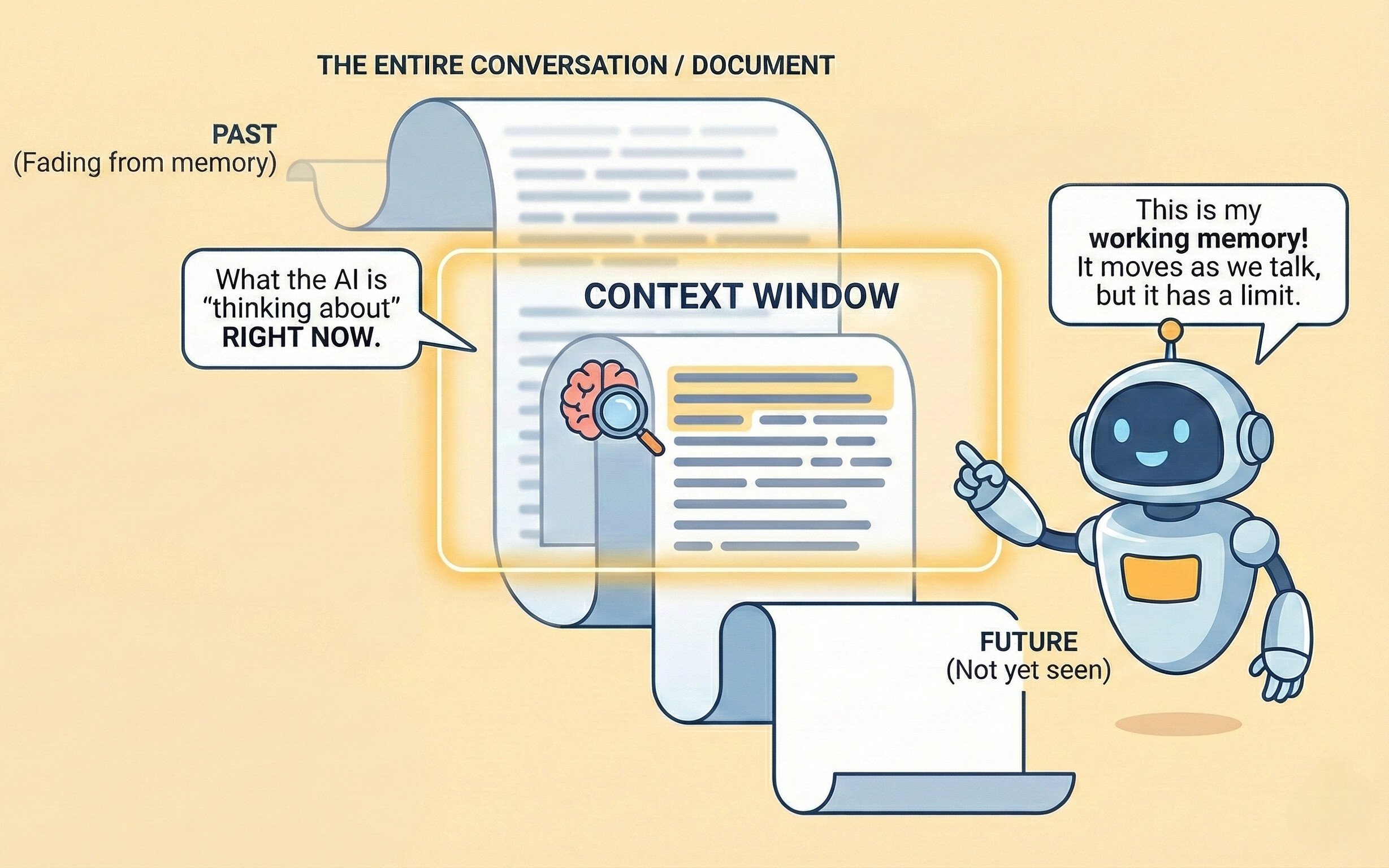
Think of the context window as the AI's "working memory", it's how much of your conversation the AI can "see" and remember at any given moment.
**Analogy:**
Imagine reading a book through a narrow slot that only shows you a few pages at a time. As you slide the slot forward to read new pages, the earlier pages slide out of view. That's how a context window works.
 ### Why It Matters
The AI can only reference information within its current context window.
Details from early in very long conversations may be "forgotten" as they fall outside the window.
### What Happens When Context Fills Up?
When a conversation exceeds the context window, the AI "forgets" the earliest parts of your conversation. This can lead to:
* Loss of context from earlier decisions or information
* Potential inconsistency with earlier statements
* Confused responses when you reference old messages
If you reference something from much earlier in a long conversation and get a confused response, the context window may be full. Start a new conversation and summarize the relevant context.
***
## When to Start or Continue a Conversation
Use the following guidance to decide whether to start a new conversation or continue your current one for optimal AI responses.
You should start a new conversation when:
You are moving to a completely unrelated subject.
The AI seems confused or gives inaccurate, off-topic, or incorrect responses.
Your conversation has become lengthy with extended back-and-forth.
You want an unbiased answer, free from prior discussion context.
If response quality drops or the AI references outdated information, it is often more efficient to start a new conversation with a concise summary of your current needs rather than trying to correct the ongoing one.
Continue the current conversation when:
Each exchange builds directly on earlier questions or results.
You are improving, refining, or revising what was previously discussed.
You are delving into related facets or aspects of the same overall topic.
The AI needs to remember prior details, choices, or constraints to respond effectively.
Ask yourself: “Does the AI need to retain our earlier discussion to answer this well?” If yes, continue. If not, start a new conversation.
***
## Building on Previous Responses
Effective conversation flow builds naturally on what's already been discussed.
**Example progression:**
```
You: "Explain the benefits of containerization with Docker."
AI: [Provides explanation including portability, consistency, and isolation]
You: "You mentioned isolation as a benefit. How does Docker's isolation
compare to traditional virtual machines in terms of resource usage?"
```
In longer conversations, periodically summarize key points to reinforce important context:
```
So far we've established that:
1. Microservices offer scalability benefits for our use case
2. The team needs Kubernetes experience
3. The initial setup cost is approximately 3 months
Given this context, what's the recommended team structure?
```
### Understanding Tokens and Model Selection
Context windows are measured in **tokens** that represent roughly 4 characters or about ¾ of a word.
**Common Models and Their Context Windows:**
| Model | Context Window | Best For |
| -------------------- | -------------- | ----------------------------------------------- |
| **GPT-4o** | 128K tokens | Balanced performance, general-purpose tasks |
| **GPT-4o mini** | 128K tokens | High-volume, cost-sensitive conversations |
| **Claude Sonnet 4** | 200K tokens | Advanced reasoning, document analysis |
| **Gemini 2.5 Pro** | 1M tokens | Extended conversations, large document analysis |
| **Gemini 2.5 Flash** | 1M tokens | Speed-optimized long conversations |
When selecting a model in WonkaChat, consider the context window if you're planning extended conversations. Learn more in [Creating Your First Agent](/ai-agents/creating-your-first-agent).
### Managing Multiple Workstreams
For juggling multiple projects, use separate conversations by project:
```
Conversation 1: "Project Alpha - Frontend Development"
Conversation 2: "Project Alpha - Backend API"
Conversation 3: "Project Beta - Data Analysis"
```
This approach keeps context clean and prevents "polluting" your context window with information that might bias future responses.
### Rehydrating Context
When starting a fresh conversation about a related topic, provide a concise summary of relevant prior context:
```
"Context from previous session: We're implementing a new CRM system for
our sales team of 50 people. Budget is $100K, timeline is 6 months, and
we need integration with our existing email platform and calendar system.
New question: Given these requirements, what training approach would you
recommend for onboarding the sales team?"
```
## Common Pitfalls to Avoid
**Problem:** Starting a new conversation with "As we discussed yesterday..." without re-establishing context.
**Solution:** Always provide relevant context at the start of new conversations.
**Problem:** Using one conversation for multiple unrelated tasks, leading to confused responses.
**Solution:** Start new conversations for distinct topics.
**Problem:** Continuing a conversation even when responses become less relevant or accurate.
**Solution:** Recognize when the context window is full and start fresh with a summary.
### Why It Matters
The AI can only reference information within its current context window.
Details from early in very long conversations may be "forgotten" as they fall outside the window.
### What Happens When Context Fills Up?
When a conversation exceeds the context window, the AI "forgets" the earliest parts of your conversation. This can lead to:
* Loss of context from earlier decisions or information
* Potential inconsistency with earlier statements
* Confused responses when you reference old messages
If you reference something from much earlier in a long conversation and get a confused response, the context window may be full. Start a new conversation and summarize the relevant context.
***
## When to Start or Continue a Conversation
Use the following guidance to decide whether to start a new conversation or continue your current one for optimal AI responses.
You should start a new conversation when:
You are moving to a completely unrelated subject.
The AI seems confused or gives inaccurate, off-topic, or incorrect responses.
Your conversation has become lengthy with extended back-and-forth.
You want an unbiased answer, free from prior discussion context.
If response quality drops or the AI references outdated information, it is often more efficient to start a new conversation with a concise summary of your current needs rather than trying to correct the ongoing one.
Continue the current conversation when:
Each exchange builds directly on earlier questions or results.
You are improving, refining, or revising what was previously discussed.
You are delving into related facets or aspects of the same overall topic.
The AI needs to remember prior details, choices, or constraints to respond effectively.
Ask yourself: “Does the AI need to retain our earlier discussion to answer this well?” If yes, continue. If not, start a new conversation.
***
## Building on Previous Responses
Effective conversation flow builds naturally on what's already been discussed.
**Example progression:**
```
You: "Explain the benefits of containerization with Docker."
AI: [Provides explanation including portability, consistency, and isolation]
You: "You mentioned isolation as a benefit. How does Docker's isolation
compare to traditional virtual machines in terms of resource usage?"
```
In longer conversations, periodically summarize key points to reinforce important context:
```
So far we've established that:
1. Microservices offer scalability benefits for our use case
2. The team needs Kubernetes experience
3. The initial setup cost is approximately 3 months
Given this context, what's the recommended team structure?
```
### Understanding Tokens and Model Selection
Context windows are measured in **tokens** that represent roughly 4 characters or about ¾ of a word.
**Common Models and Their Context Windows:**
| Model | Context Window | Best For |
| -------------------- | -------------- | ----------------------------------------------- |
| **GPT-4o** | 128K tokens | Balanced performance, general-purpose tasks |
| **GPT-4o mini** | 128K tokens | High-volume, cost-sensitive conversations |
| **Claude Sonnet 4** | 200K tokens | Advanced reasoning, document analysis |
| **Gemini 2.5 Pro** | 1M tokens | Extended conversations, large document analysis |
| **Gemini 2.5 Flash** | 1M tokens | Speed-optimized long conversations |
When selecting a model in WonkaChat, consider the context window if you're planning extended conversations. Learn more in [Creating Your First Agent](/ai-agents/creating-your-first-agent).
### Managing Multiple Workstreams
For juggling multiple projects, use separate conversations by project:
```
Conversation 1: "Project Alpha - Frontend Development"
Conversation 2: "Project Alpha - Backend API"
Conversation 3: "Project Beta - Data Analysis"
```
This approach keeps context clean and prevents "polluting" your context window with information that might bias future responses.
### Rehydrating Context
When starting a fresh conversation about a related topic, provide a concise summary of relevant prior context:
```
"Context from previous session: We're implementing a new CRM system for
our sales team of 50 people. Budget is $100K, timeline is 6 months, and
we need integration with our existing email platform and calendar system.
New question: Given these requirements, what training approach would you
recommend for onboarding the sales team?"
```
## Common Pitfalls to Avoid
**Problem:** Starting a new conversation with "As we discussed yesterday..." without re-establishing context.
**Solution:** Always provide relevant context at the start of new conversations.
**Problem:** Using one conversation for multiple unrelated tasks, leading to confused responses.
**Solution:** Start new conversations for distinct topics.
**Problem:** Continuing a conversation even when responses become less relevant or accurate.
**Solution:** Recognize when the context window is full and start fresh with a summary.