> ## Documentation Index
> Fetch the complete documentation index at: https://help.wonka.chat/llms.txt
> Use this file to discover all available pages before exploring further.
# Business Teaching
> Provide business context to agents for accurate, company-specific responses.
Teaching your business context to agents ensures they understand your company's terminology, processes, and policies. This enables agents to deliver responses grounded in your actual operations instead of relying on generic assumptions.
Business teaching helps agents use your exact terminology, follow your processes, and align with your company policies.
***
## Why Teach Your Business Context?
Without business context, agents make generic assumptions. With it, they provide accurate, company-specific responses.
**Example - Writing a customer support email:**
**Without context:** "Most companies offer refunds within 14-30 days. Check your company's specific policy."
**With context:** "Our refund policy allows requests within 30 days, processed in 3-5 business days. Would you like me to initiate one?"
### Key Benefits
Agents use your exact terms, policies, and processes
Grounding in your information prevents hallucinations (AI making up incorrect details)
Agents maintain your voice, tone, and communication style
Team members get reliable, actionable information
***
## How to Provide Business Context
### Add Context to Agent Instructions
Include company-specific information directly in agent instructions. Start with essentials and expand as needed.
Define how agents should communicate to match your brand.
**Example:**
```
Communication style:
- Professional but friendly, never overly casual
- Use active voice and direct language
- Address customers by first name
- Keep responses concise and actionable
```
Include specific phrases to use or avoid. This ensures consistency across all agent interactions.
Define company-specific terms, product names, and acronyms.
**Example:**
```
Key terms:
- "Premium tier" = enterprise subscription level
- "Quick-start" = our 15-minute onboarding process
- MRR = Monthly Recurring Revenue
- CS = Customer Success (not Customer Support)
```
Clear definitions prevent misunderstandings and ensure agents use your language.
Include relevant policies so agents can answer questions accurately.
**Example:**
```
Key policies:
- Refunds: Full refund within 30 days, processed in 3-5 business days
- Support hours: 9 AM-6 PM EST, Monday-Friday
- Response SLA: 4 business hours for standard, 1 hour for enterprise
- Escalation: Issues over \$500 require manager approval
```
Always verify agents apply policies correctly before deploying to your team. Test with realistic scenarios.
Document step-by-step workflows agents should follow.
**Example:**
```
Customer onboarding process:
1. Send welcome email with login credentials
2. Schedule orientation call within 48 hours
3. Assign dedicated success manager
4. Provide access to training materials
5. Follow up after 7 days
```
Clear processes ensure consistency and completeness in agent actions.
**Best practice:** Update instructions when policies or processes change. Outdated context leads to incorrect information.
***
### Upload Documents for Deep Context
For extensive information like product documentation, policy manuals, or knowledge bases, upload documents that agents can automatically search and reference when answering questions.
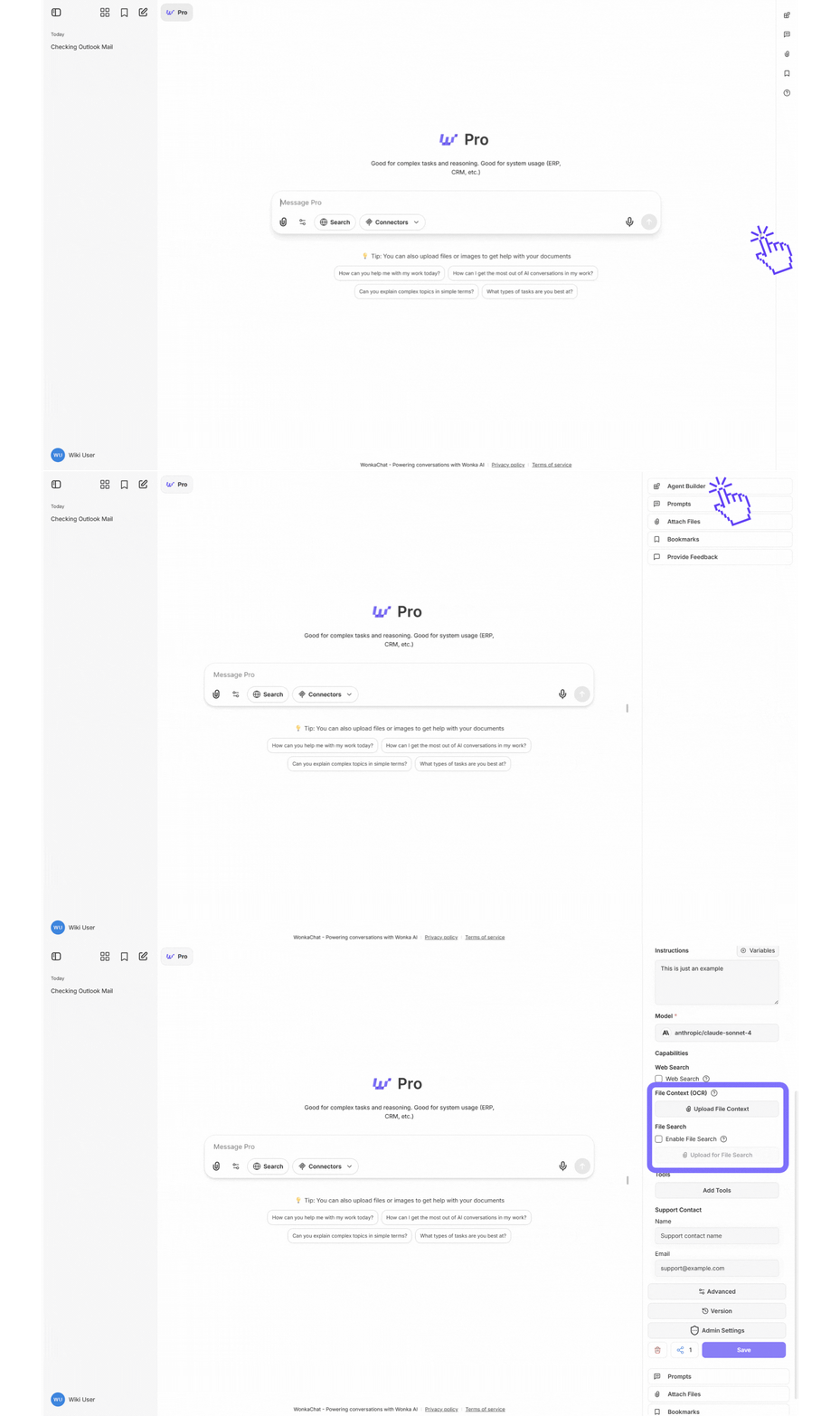 **Why upload documents?**
* Agents can access detailed information without cluttering instructions
* Perfect for comprehensive documentation that's too large for instructions
* Information stays current by updating documents anytime without changing agent instructions
**Best for:** Product documentation, policy manuals, process guides, training materials, knowledge bases
Use instructions for critical information needed in every response. Use documents for extensive reference material that agents retrieve only when relevant.
When you upload documents, WonkaChat uses **RAG (Retrieval-Augmented Generation)** to make them searchable for agents.
**How it works:**
1. **Upload**: You provide company documents
2. **Index**: Documents are processed and made searchable
3. **Retrieve**: When relevant, agents automatically find information from documents
4. **Generate**: Agents produce responses grounded in your actual documentation
**Document preparation tips:**
* **Use clear headings**: Well-structured sections improve retrieval accuracy
* **Keep sections focused**: One topic per section
* **Include context**: Write sections to be understandable independently (e.g., "Our Premium tier (\$99/month) includes..." not just "It includes...")
* **Stay consistent**: Use the same terminology throughout
**Security and privacy:**
* Documents stored securely within your WonkaChat environment
* Never used to train AI models
* Accessible only to users with agent permissions
**Learn more about RAG:** For deeper technical details, see [Anthropic's](https://www.anthropic.com/engineering/contextual-retrieval) or [OpenAI's](https://platform.openai.com/docs/guides/optimizing-llm-accuracy#retrieval-augmented-generation-rag) or [Google's](https://cloud.google.com/use-cases/retrieval-augmented-generation) RAG Guides.
***
## Examples by Use Case
**Context needed:** Product features, support policies, troubleshooting steps, communication guidelines
**Example instruction snippet:**
```
Support guidelines:
- Always verify account before sharing details
- Use knowledge base articles for technical issues
- Escalate billing issues over 500$ to finance team
- Response tone: Empathetic, solution-focused, professional
```
**Context needed:** Company voice, common email types, approval workflows, internal terminology
**Example instruction snippet:**
```
Email style:
- Internal emails: Direct and concise
- External emails: Professional and courteous
- Always include relevant stakeholders in CC when appropriate
- Use company signature format: [Name] | [Title] | [Department]
```
**Context needed:** Product positioning, pricing, target audience, sales processes, competitive info
**Example instruction snippet:**
```
Sales context:
- Target: Mid-market companies (50-500 employees)
- Key value prop: 40% time savings on project management
- Pricing: Start at 49$/user/month
- Never discount without manager approval
```
**Why upload documents?**
* Agents can access detailed information without cluttering instructions
* Perfect for comprehensive documentation that's too large for instructions
* Information stays current by updating documents anytime without changing agent instructions
**Best for:** Product documentation, policy manuals, process guides, training materials, knowledge bases
Use instructions for critical information needed in every response. Use documents for extensive reference material that agents retrieve only when relevant.
When you upload documents, WonkaChat uses **RAG (Retrieval-Augmented Generation)** to make them searchable for agents.
**How it works:**
1. **Upload**: You provide company documents
2. **Index**: Documents are processed and made searchable
3. **Retrieve**: When relevant, agents automatically find information from documents
4. **Generate**: Agents produce responses grounded in your actual documentation
**Document preparation tips:**
* **Use clear headings**: Well-structured sections improve retrieval accuracy
* **Keep sections focused**: One topic per section
* **Include context**: Write sections to be understandable independently (e.g., "Our Premium tier (\$99/month) includes..." not just "It includes...")
* **Stay consistent**: Use the same terminology throughout
**Security and privacy:**
* Documents stored securely within your WonkaChat environment
* Never used to train AI models
* Accessible only to users with agent permissions
**Learn more about RAG:** For deeper technical details, see [Anthropic's](https://www.anthropic.com/engineering/contextual-retrieval) or [OpenAI's](https://platform.openai.com/docs/guides/optimizing-llm-accuracy#retrieval-augmented-generation-rag) or [Google's](https://cloud.google.com/use-cases/retrieval-augmented-generation) RAG Guides.
***
## Examples by Use Case
**Context needed:** Product features, support policies, troubleshooting steps, communication guidelines
**Example instruction snippet:**
```
Support guidelines:
- Always verify account before sharing details
- Use knowledge base articles for technical issues
- Escalate billing issues over 500$ to finance team
- Response tone: Empathetic, solution-focused, professional
```
**Context needed:** Company voice, common email types, approval workflows, internal terminology
**Example instruction snippet:**
```
Email style:
- Internal emails: Direct and concise
- External emails: Professional and courteous
- Always include relevant stakeholders in CC when appropriate
- Use company signature format: [Name] | [Title] | [Department]
```
**Context needed:** Product positioning, pricing, target audience, sales processes, competitive info
**Example instruction snippet:**
```
Sales context:
- Target: Mid-market companies (50-500 employees)
- Key value prop: 40% time savings on project management
- Pricing: Start at 49$/user/month
- Never discount without manager approval
```